
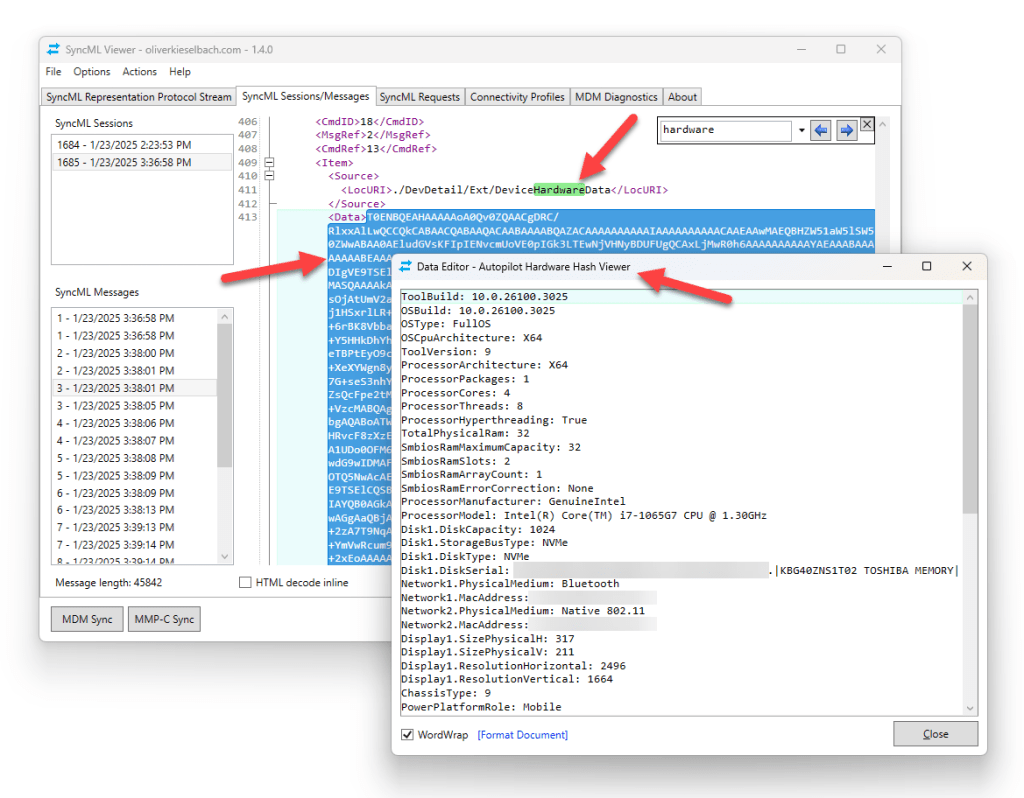
I spent some time to further enhance the SyncML Viewer utility (see here to learn more about the tool). This release (Version 1.4.0) fixes some minor bugs, and added some new features. Three of them are worth mentioning here. So, I’m showing them quickly in this update post. First of all, I have to thank Michael Niehaus again for his Autopilot Hardware Hash decoder which is part of the PowerShell Module AutopilotUtility. I used the logic to provide a Hardware Hash decode functionality within the SyncML Viewer v1.4.0.
You can now select a hardware hash in the protocol stream and decode it via Menu > Actions > Decode Autopilot Hardware Hash or use Ctrl + U
Finding related information about received information in the MDM protocol (SyncML) stream is often pattern matching. So I decided to add also a NodeCache Lookup. The SyncML protocol uses a NodeCache to sync everything with the server. During a MDM sync session, this NodeCache is synchronized and the server asks for ChangedNodes on the client. The client will respond with the corresponding ids. These ids can be viewed in the registry (HKLM\SOFTWARE\Microsoft\Provisioning\NodeCache\CSP\Device\MS DM Server\Nodes\<id>) to get more info what was changed after last MDM sync. To use it, follow the same procedure, find the ChancedNodes in the SyncML protocol stream and select a Node number and use Menu > Actions > Lookup NodeCache Entry in Registry or Ctrl + G

And as last small extra feature, I added a Hex Viewer. If you like to see any data in hex just use Menu > Actions > View as HEX or Ctrl + T

The full change log is here:
- added Autopilot Hardware Hash decode function (thanks to Michael Niehaus!)
- added NodeCache Lookup
- added Hex Viewer
- added more AutoComplete samples
- added GridSplitter for SyncML Requests Window
- added count of total received bytes (tooltip on capturing icon)
- added Clear Stream confirmation dialog
- added more Status Codes for Health Attestation (thanks to Tom Plant!)
- Status Code Tab hidden, use Help to get there
better use key combination Ctrl + E on selected status code text instead - Data Editor renaming’s and behavior switch to non-modal
- fixed Diagnostics Tab naming’s (AzureAD -> Entra)
- fixed MDMDiagnostics Bug
- fixed truncated message indicator threshold
- fixed WiFi and VPN enumeration now async
- updated dependencies
- code maintenance work
I published the update to WinGet and I published the new version to Scoop as well (thx to Olav for teh suggestion) which is another PackageManager for Windows:
WinGet
winget install SyncMLViewerIf there is the previous version 1.3.1 installed run the update command:
winget update SyncMLViewerScoop
scoop bucket add extras
scoop install extras/SyncMLViewer
If you want to have some info about the tool have a look at these posts as well:
- Windows 10 MDM client activity monitoring with SyncML Viewer
- New SyncML Viewer version
- MDM Local Management using SyncML Viewer
- Enhancing usability of SyncML Viewer
Download and feedback
I hope these usability enhancements will help research and dig into the MDM stack. If there is feedback leave a comment or open an issue on GitHub.
The project is maintained on GitHub here:
https://github.com/okieselbach/SyncMLViewer
Here a direct link to the zip archived program:
https://github.com/okieselbach/SyncMLViewer/tree/master/SyncMLViewer/dist

